파일 업로드 실습 (2) 시큐어 코딩 및 보안 설정
실습 내용
아래는 apm 환경에서 파일 업로드 기능을 수행하는 코드이다.
1
2
3
4
5
6
7
8
9
10
11
12
13
14
15
16
17
18
19
20
21
22
23
24
25
26
27
28
29
30
31
32
33
34
35
36
37
38
39
40
41
42
43
44
45
46
47
48
49
50
51
52
53
54
55
56
57
58
59
60
61
62
63
64
65
66
67
68
69
70
71
72
73
74
75
76
77
78
79
80
<?php
session_start();

$username = $_SESSION["username"];

$title = $_POST["title"];
$content = $_POST["content"];

$title = htmlspecialchars($title, ENT_QUOTES);
$content = htmlspecialchars($content, ENT_QUOTES);
$wr_date = date("Y-m-d (H:i)");

$upload_dir = './file/';

$upfile_name      = $_FILES["upfile"]["name"];
$upfile_tmp_name  = $_FILES["upfile"]["tmp_name"];
$upfile_type      = $_FILES["upfile"]["type"];
$upfile_size      = $_FILES["upfile"]["size"];
$upfile_error     = $_FILES["upfile"]["error"];

if ($upfile_name && !$upfile_error) {
    $file = explode(".", $upfile_name);
    $file_name = $file[0];
    $file_ext  = $file[1];

    $copied_file_name = date("Y_m_d_H_i_s") . "." . $file_ext;
    $uploaded_file    = $upload_dir . $copied_file_name;

    // 허용되는 이미지 파일 타입 4개만...
    $allowed_types = ['image/gif', 'image/jpeg', 'image/png', 'image/jpg'];

    if (!in_array($upfile_type, $allowed_types)) {
        echo("
            <script>
            alert('이미지 파일만 저장 가능');
            history.go(-1);
            </script>
        ");
        exit;
    }

    if ($upfile_size > 10000000) {
        echo("
            <script>
            alert('업로드 파일 크기가 지정된 용량(10MB)을 초과합니다.');
            history.go(-1);
            </script>
        ");
        exit;
    }

    if (!move_uploaded_file($upfile_tmp_name, $uploaded_file)) {
        echo("
            <script>
            alert('파일을 지정한 디렉토리에 복사하는데 실패했습니다.');
            history.go(-1);
            </script>
        ");
        exit;
    }
} else {
    $upfile_name      = "";
    $upfile_type      = "";
    $copied_file_name = "";
}

$conn = mysqli_connect("localhost", "test22", "pass22", "logintest");

$sql  = "INSERT INTO memberboard (username, title, content, wr_date, ";
$sql .= "file_name, file_type, file_copied) ";
$sql .= "VALUES ('$username', '$title', '$content', '$wr_date', ";
$sql .= "'$upfile_name', '$upfile_type', '$copied_file_name')";

mysqli_query($conn, $sql);
mysqli_close($conn);

echo "<script>
    location.href = 'member_list.php';
</script>";
?>
원래 있던 코드에서 실기 기출 문제(파일 타입 검증)를 반영해 몇 줄만 추가한 상태..
./file 디렉터리에 업로드 시각을 바탕으로 파일 이름을 바꿔서 저장하는데, 파일 사이즈 검증과 파일 타입만 검증하고 있다.
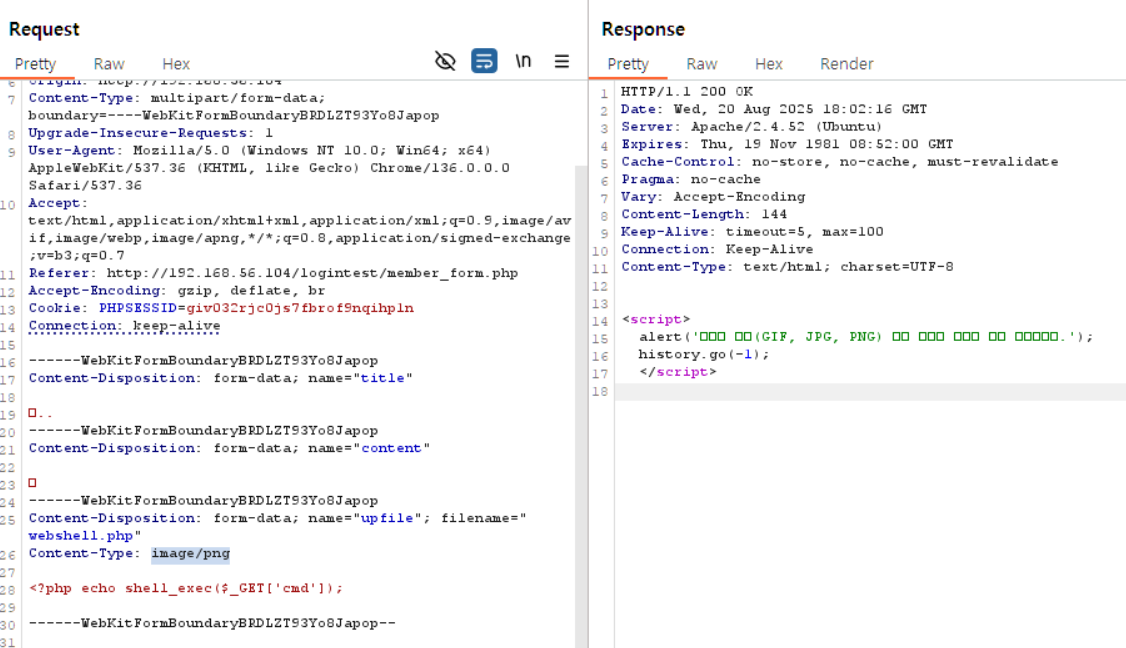
지난 게시글에서 썼듯이 파일 타입을 쉽게 우회하여 웹쉘을 업로드 할 수 있었고, 해당 경로에 접근해 웹쉘이 실행되는 것도 확인할 수 있다.
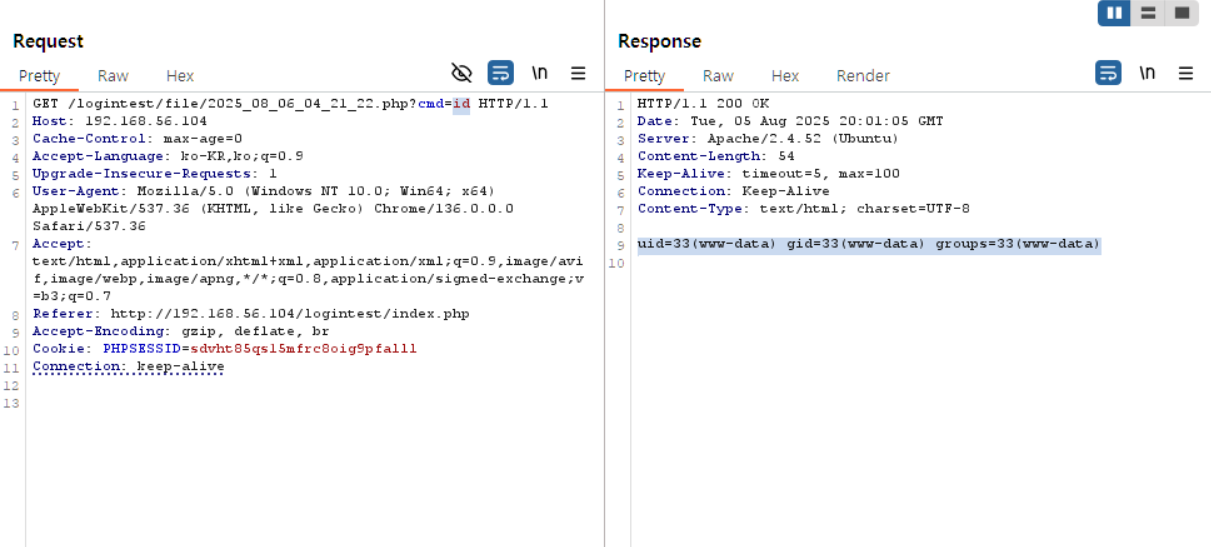
따라서 1차적으로
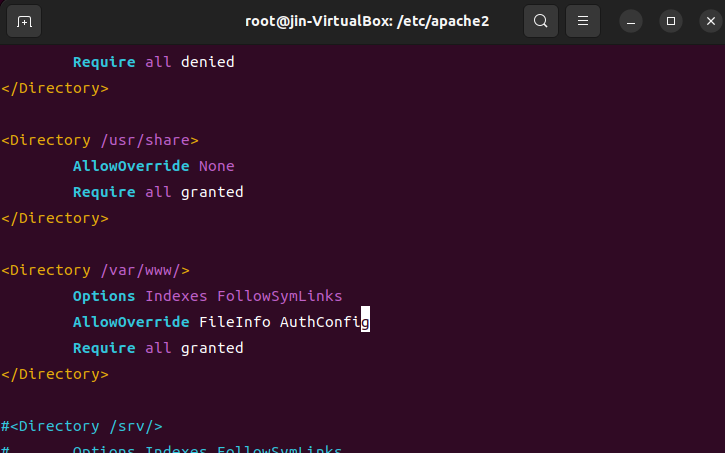
업로드되는 파일을 저장하는 디렉터리에 서버 사이드 스크립트 파일이 실행되지 않도록, 직접 URL 호출을 차단하도록 했다.
아파치 설정파일에 해당 디렉터리 섹션의 AllowOverride 지시자에 Fileinfo 설정을 하고,
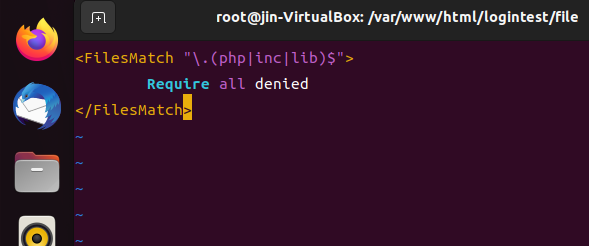
파일 업로드 디렉터리(/file)에 액세스 파일(.htaccess)를 생성하여 아래와 같이 php, lib, inc 파일에 대한 직접 URL 호출을 차단한다.
이후 전과 같이 파일 타입을 우회하여 업로드한 php 파일을 실행시키면, 403에러가 뜨는 것을 볼 수 있다.
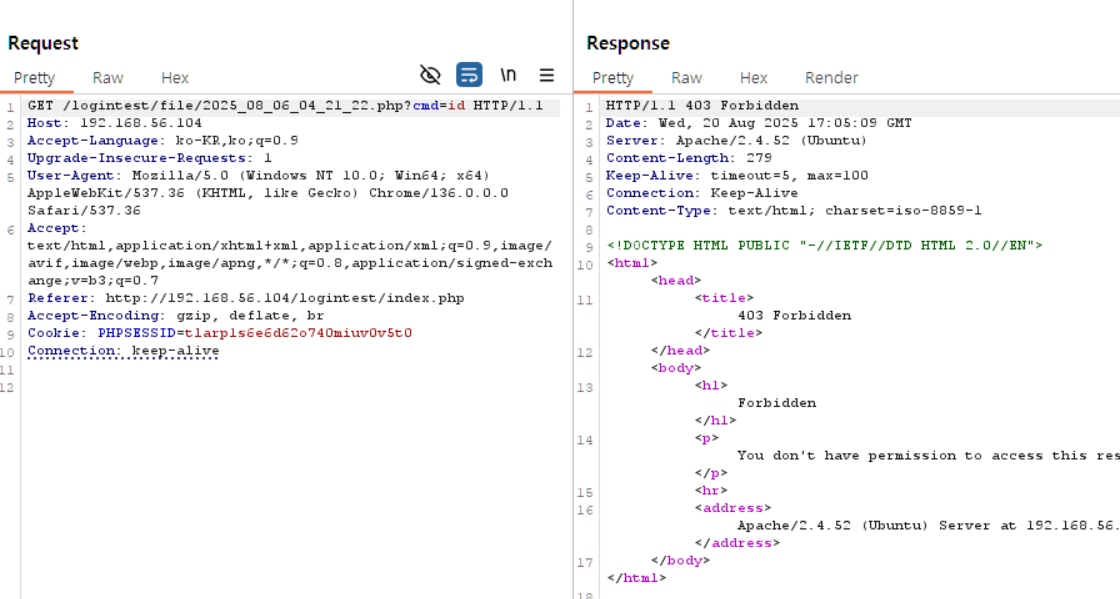
이후 해당 보안 설정을 어떻게 우회할 수 있는지 고민해보았는데…
만약 LFI 취약점이 존재한다면 웹쉘 파일을 include 해서 실행시킬 수 있을 것 같다.
위에서 한 보안설정은 어디까지나 apache 설정을 통해 url 호출을 차단하는 거고…
파일 삽입 취약점이 존재해서 업로드한 웹쉘을 include() 해올 수 있으면 아파치 설정과는 별개로 웹쉘을 읽어오며 실행될테니까?
따라서 업로드되는 파일 디렉터리를 아예 웹루트 밖에 두면 업로드 파일 위치 유추해서 LFI 공격하기도 어려울거고..
파일 삽입 취약점에 대한 보안 설정(APM 환경의 예로, pnp.ini에서 allow_url_fopen을 Off 설정하기)도 하면 좋을 것이다.
또한 허용할 파일 타입을 화이트리스트 필터링을 하되, MIME 검증으로 수정했다.
아래는 수정한 코드이다.
1
2
3
4
5
6
7
8
9
10
11
12
13
14
15
16
17
18
19
20
21
22
23
24
25
26
27
28
29
30
31
32
33
34
35
36
37
38
39
40
41
42
43
44
45
46
47
48
49
50
51
52
53
54
55
56
57
58
59
60
61
62
63
64
65
66
67
68
69
70
71
72
73
74
75
76
77
78
79
80
81
82
83
<?php
session_start();

$username = $_SESSION["username"];

$title = $_POST["title"];
$content = $_POST["content"];

$title = htmlspecialchars($title, ENT_QUOTES);
$content = htmlspecialchars($content, ENT_QUOTES);
$wr_date = date("Y-m-d (H:i)");

$upload_dir = './file/';

$upfile_name      = $_FILES["upfile"]["name"];
$upfile_tmp_name  = $_FILES["upfile"]["tmp_name"];
$upfile_type      = $_FILES["upfile"]["type"];
$upfile_size      = $_FILES["upfile"]["size"];
$upfile_error     = $_FILES["upfile"]["error"];

if ($upfile_name && !$upfile_error) {
    $file = explode(".", $upfile_name);
    $file_name = $file[0];
    $file_ext  = $file[1];

    $copied_file_name = date("Y_m_d_H_i_s") . "." . $file_ext;
    $uploaded_file    = $upload_dir . $copied_file_name;

    // 수정된 부분 시작
    $allowed_types = [
        'image/gif', 'image/jpeg', 'image/png', 'image/jpg', 'text/plain'
    ];

    $finfo = finfo_open(FILEINFO_MIME_TYPE); //서버에서 MIME 타입 확인 (finfo)
    $real_type = finfo_file($finfo, $upfile_tmp_name);
    finfo_close($finfo);

    if (!in_array($real_type, $allowed_types)) {
        echo("
        <script>
        alert('이미지 파일(GIF, JPG, PNG) 또는 텍스트 파일만 저장 가능합니다.');
        history.go(-1);
        </script>
        ");
        exit;
    }
    // 수정된 부분 끝

    if ($upfile_size > 10000000) {
        echo("
        <script>
        alert('업로드 파일 크기가 지정된 용량(10MB)을 초과합니다.');
        history.go(-1);
        </script>
        ");
        exit;
    }

    if (!move_uploaded_file($upfile_tmp_name, $uploaded_file)) {
        echo("
        <script>
        alert('파일을 지정한 디렉토리에 복사하는데 실패했습니다.');
        history.go(-1);
        </script>
        ");
        exit;
    }
} else {
    $upfile_name      = "";
    $upfile_type      = "";
    $copied_file_name = "";
}

$conn = mysqli_connect("localhost", "test22", "pass22", "logintest");
$sql = "INSERT INTO memberboard (username, title, content, wr_date, file_name, file_type, file_copied)
        VALUES ('$username', '$title', '$content', '$wr_date', '$upfile_name', '$upfile_type', '$copied_file_name')";
mysqli_query($conn, $sql);
mysqli_close($conn);

echo "<script>
    location.href = 'member_list.php';
</script>";
?>
이후 전과 같이 웹쉘 업로드를 시도했을 때 막히는 것을 확인할 수 있다.